v2.2.2latest
November 9, 2026
Companion 2.2.2 released alongside.
One Template Workbench view with Fields and Note preview, adaptive layout, export fix
This release rebuilds the Template Workbench as one view. ZotLit Companion 2.2.2 ships with it and has no changes of its own, so Companion 2.2.0 and 2.2.1 keep working.
Highlights
The Template Workbench in one view
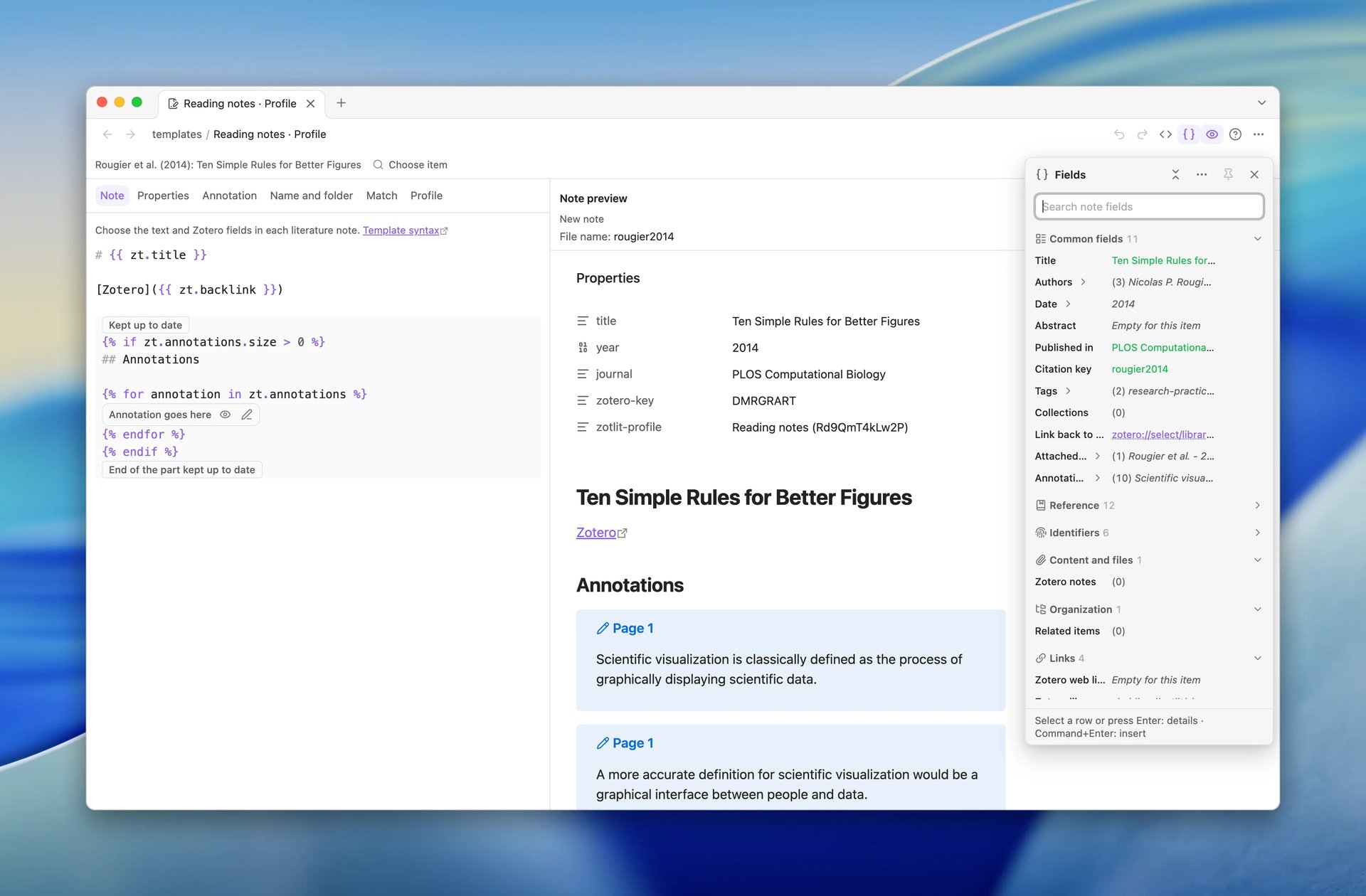
The template editor, the Fields panel, and the Note preview now sit together in one view, in its own Obsidian window. Choose a paper once and all three show it.
- Note preview: beside the editor in a wide window, under it in a narrow one. A button in its header switches between reading view and Markdown.
- Fields panel: select Fields to find a field, see its value, and insert it. Pin it to keep it beside the editor.
- Dividers: drag them to resize the parts, as in Obsidian.
Breaking Changes
One command opens the Template Workbench
ZotLit: Open template workbench is now the only way in. It works from a profile, a template document, or a literature note. These commands and menu entries are gone:
- "Switch to template workbench view". Use ZotLit: Open template workbench.
- "Customize this note's template". Run ZotLit: Open template workbench from the note. It opens the note's profile with the note's paper selected. Update this note still applies your change to that note.
- "Open note preview". The Note preview is now part of the view.
If you set a hotkey for one of these, set it again on ZotLit: Open template workbench. ZotLit 2.2.1 also had a second command with that name, for profile documents. A hotkey on it is gone too.
A workspace that kept a Note preview tab from 2.2.1 shows it as an empty tab. Close it.
What's New
Other improvements
- You can now put an annotation into a note straight from the PDF. Click the annotation mark to select it, then drag the mark into the note. ZotLit inserts it as a drag from the annotation view does. See Drag an annotation into a note.
- To change the order of properties, drag a row on the Properties tab by its handle (Drag to reorder). The handle shows when you point to the row. You can also select the handle and press
Alt+Arrow UporAlt+Arrow Down. The handle replaces the Move up and Move down buttons. See Configure frontmatter properties. - The view's pane menu is shorter. Each action in the view header also has an entry there.
- Note embeds in the Note preview now show a placeholder with the note's name and whether the note exists. Before, the preview loaded the embedded note or offered to create a missing one.
- Query blocks and query file embeds in the Note preview now list each view with its layout and rows. They mark the views that show Only this note's item, and they show problems in the query text.
- Each Template Workbench tab now links to the docs page for that part of the template, such as Property guide on the Properties tab. The Help menu has the Template guide, Template syntax, and Template data reference. The template data explorer links to the Template data guide.
- The dividers in the Library View now look like Obsidian's pane dividers.
Bug Fixes
- In the Template Workbench, after you moved a Properties row, every row showed its raw rule for a moment. The Name tab example blinked the same way. Now each row keeps its value while the preview renders again.
- ZotLit: Export note with citations could read a
---line in the note body as Properties. Now the line stays in the exported document. - If you run Pandoc yourself, a
---line had the same problem. A line that starts with%after the Properties became the document title. Now both stay as text. Save the ZotLit integration pair again to get the fix. - In a PDF opened in its own window, the popup of a selected annotation moved to the main window when you clicked there. Now it stays with the PDF.
- In a separate window, some parts of ZotLit did not adapt when you resized the window: a pinned popover, the Library View layout, and the abstract on a reading card. Now they adapt as in the main window.
- In a separate window, some actions were slow while the main window was hidden: the Cited by search, the save of a query file, the refresh of a Query View, and the item picker. Now they run at full speed.
- ZotLit now finds your Zotero profile in more setups. On Linux, it also finds a Zotero profile under
~/.config/zotero. On Windows, it follows an AppData folder that was moved to another place.