Changelog
Every ZotLit release, newest first. Companion releases are noted with the plugin version they shipped beside.
Empty imported notes, quick switcher details, Zotero menu commands on Zotero 10.0.2
Companion 2.1.4 released alongside.
Bug Fixes
- Fixed imported notes arriving with nothing but frontmatter (discussion #944). A Zotero child note created by another Zotero plugin or by automation, rather than typed in Zotero's own note editor, lost its entire body on import, with no warning. ZotLit only converted notes that carried Zotero's note-editor formatting marker. These notes now import with their content intact. Headings, paragraphs, bold text, and lists all become Markdown. Notes written in Zotero's note editor import exactly as before.
- Fixed the "Open literature note quick switcher" command showing only a title for most item types (discussion #939). The second line under each result, with authors, year, and where the work appeared, filled in for Journal Article items only. A Preprint, Book Section, Thesis, Report, Conference Paper, or Webpage showed a bare title, which made results hard to tell apart even though Zotero held the authors and ZotLit passed them to templates. Every item type now shows that second line, and the "where it appeared" part follows the item type, so a Preprint shows its repository such as arXiv and a Book shows its publisher. Custom item types and custom fields resolve too, and an item with no such field shows authors and year.
- Fixed the note commands in Zotero's item menu doing nothing on Zotero 10.0.2 (discussion #1064). Right-clicking an item and choosing "Open Literature Note in Obsidian" or "Create or Update Literature Notes" gave no feedback of any kind. Obsidian stayed closed and no error dialog appeared, because Zotero 10.0.2 tightened how add-ons may hand links to the operating system. Annotation sync and starting from the Obsidian side kept working throughout. Both commands open Obsidian again once you update the ZotLit companion add-on in Zotero to 2.1.4. The Obsidian plugin update alone does not fix this.
Reading view stability, reliable annotation drag-and-drop
Bug Fixes
- Fixed Reading view flickering, jumping to the top, and resetting embedded content whenever any file in the vault changed (discussion #993). Toggling a checkbox in an Obsidian Base embedded in a note, or editing any other note, caused ZotLit to rerender every open Reading view. ZotLit now updates only the citations that actually changed. Scroll position, selected Base view, and embedded state all remain where you left them. Hover states and popovers on citations also stay open through Zotero database refreshes.
- Fixed dragging annotations from the Annotation Panel sometimes inserting only the raw highlight text instead of the rendered template output (discussion #966). The more plugins were loaded, the more often this happened. The drag handle now stays ready between preparations. When it is briefly unavailable (during a note switch or right after a drop), the annotation card dims its handle and cancels the drag with a notice instead of silently falling back to plain text.
Fixed false 'no matching item' errors and citation flickering
Bug Fixes
- Fixed false "no matching item" errors that appeared after restarting Obsidian or after a period of inactivity. Citations that the item picker could still find would show a notice saying the citation key "matches no item in your Zotero library," and the error persisted until the next restart. ZotLit's citation-key lookup could fall out of sync on startup, and once broken it never recovered on its own. The lookup now stays consistent through startup and rebuilds itself after a failed read, so existing citations resolve correctly without a restart.
- Fixed citations flickering to raw
@citekeytext while typing. Each time Obsidian saved, the rendered citation text briefly disappeared before the fresh render arrived. The previous citation text now stays on screen while ZotLit re-renders, so citations remain stable during typing. - Fixed citations and the References Sidebar flashing back to placeholder text when Zotero's database refreshed (for example, after editing an item in Zotero). ZotLit now keeps the previous content visible until the fresh data arrives, so a refresh that changes nothing produces no visible interruption.
Fixed Pandoc rendering breaking after Live Updates ran
Bug Fixes
- Fixed Pandoc rendering breaking after Live Updates ran once. Restarting Obsidian with Live Updates off was the only way to recover. Pandoc rendering now keeps working after Live Updates has run, with no restart needed.
Citation workflow, References Sidebar, Zotero 10 support
Companion 2.1.0 released alongside.
This is the first stable release of the v2.1 citation workflow: the References Sidebar, in-text citation rendering, the Citation Popover, and the Cited By Sidebar, alongside Zotero 10 support and multi-library scope. The changes below cover what landed since beta.3; for the full tour, read the release post.
What's New since beta.3
Pandoc engine performance
The built-in Pandoc engine now loads about three times faster: a 291 ms median load drops to 97 ms, and the JavaScript memory spike that came with each load is gone. If a cached engine binary is corrupted, ZotLit now detects it, clears it, and shows the install offer again.
Colored note-import highlights
Use colored highlight syntax, a new opt-in setting under Settings › Note import, converts highlights from Zotero note imports into emoji-based colored highlight syntax. It covers six highlight colors. A highlight with an unsupported color, or text that would break the syntax, stays as HTML instead. Annotation backlinks are preserved either way.
Bug Fixes since beta.3
- Fixed recurring notices about database read-mode fallbacks. ZotLit now routes you to Companion installation or stale-data troubleshooting instead of repeating the notice.
- Fixed Pandoc export connecting to the wrong Zotero HTTP port when more than one Zotero instance is running. The port now resolves from the active profile.
Zotero 10 support, library scope, ambiguous citation keys
Companion 2.1.0-beta.0 released alongside.
Highlights
Zotero 10 support
ZotLit now supports Zotero 10 as well as Zotero 9.
Zotero 10 changed how it stores recent edits, so changes made while Zotero was open could stay invisible to ZotLit. The Companion now keeps the database current for ZotLit automatically. When you switch from Zotero to Obsidian, your changes are already there, whether or not live updates are enabled. A new Database Status panel on the Zotero sidebar confirms that recent changes have reached the database and lets you trigger a manual update if something went wrong. See Fix Zotero changes that do not appear for details.
Library scope
ZotLit now works across several Zotero libraries at once. Library scope in Settings › ZotLit, decides which libraries item search, citation key resolution, and the library-wide commands cover. It replaces the old Default library setting.
Two modes:
- All libraries follows your Zotero database, so a group library you join later is in scope at once.
- Selected libraries stays exactly as you set it, and a group library you join later stays out until you add it.
One search now spans every library in scope, in a single relevance order. While more than one library can contribute, each result names the library its item comes from.
ZotLit: Create or update all literature notes and ZotLit: Import all child and standalone notes cover the whole scope too, and their confirmation groups rows by library. Menu entries and links from Zotero still target the exact library they came from, whether or not it is in your scope.
A group you leave keeps its place in Selected libraries, marked unavailable, so a temporary absence does not erase your choice. A library-wide run continues over the libraries that are available and states how many it skipped. See Settings › Library scope.
A scope ZotLit cannot read stays on disk as it is. ZotLit searches My Library alone, marks the setting with a warning, and clears it as soon as you set the scope again.
What the upgrade sets: upgrading selects Selected libraries with My Library alone, whatever library you had selected before, so your search scope stays as narrow as it was. Switch to All libraries, or add your group libraries, to search wider. A fresh installation starts at All libraries.
Citation keys that match several items
One citation key can sit on two Zotero items. That happens with twins in a single library, and with the same key in two libraries you now have in scope. ZotLit used to take the first match it found. It now reports the ambiguity instead of choosing for you:
- Opening such a citation asks which item you mean, listing every candidate with its library and item key. The item you pick opens by its own identity.
- Inserting one is refused, with a notice asking you to change the key in Zotero. Inserted text carries the key alone, which would no longer name the item you picked.
- The References Sidebar reports a Reference Error listing the candidates, with its Open literature note action disabled. The citation popover names them too, and hover page preview shows nothing.
- Themes can style the state through the new
zt-citation-key-ambiguousclass. See Theme hooks.
To resolve one, give one of the items a different citation key in Zotero, or narrow your library scope to the library you meant.
What's New
Citation style and language per note
A note can now render its citations under its own style and language instead of the vault-wide selection. ZotLit: Set citation presentation, also in the note's More options menu, opens a dialog on what the note reads today and writes both choices in one pass.
The choices live in the note's own properties: zotlit-csl names a style installed in Zotero, and standard Pandoc lang names the document language. Removing a property returns that note to the vault selection.
In-text citations, the References Sidebar, the Citation Popover, the copied bibliography, and the built-in export all follow the note's own presentation.
Citation locale
A new Citation locale setting under Settings › ZotLit › Citations sets the language for citation terms, dates, names, and sorting across the vault. It takes a language tag such as en-US, de, or zh-CN.
Leaving it empty keeps the language the selected style declares. See Settings › Citations.
Bug Fixes
- Fixed slow or broken database refreshes when the Zotero data directory sits on a different drive than the system temp folder, such as an external drive on macOS.
- Fixed dragging an annotation from the annotation view inserting the raw highlight text, or the annotation key for a sticky note, instead of the rendered annotation template. The insert only recovered after pressing Link to Zotero item again.
Citation Popover, copy bibliography, note-class Entry Serials
Highlights
Citation Popover
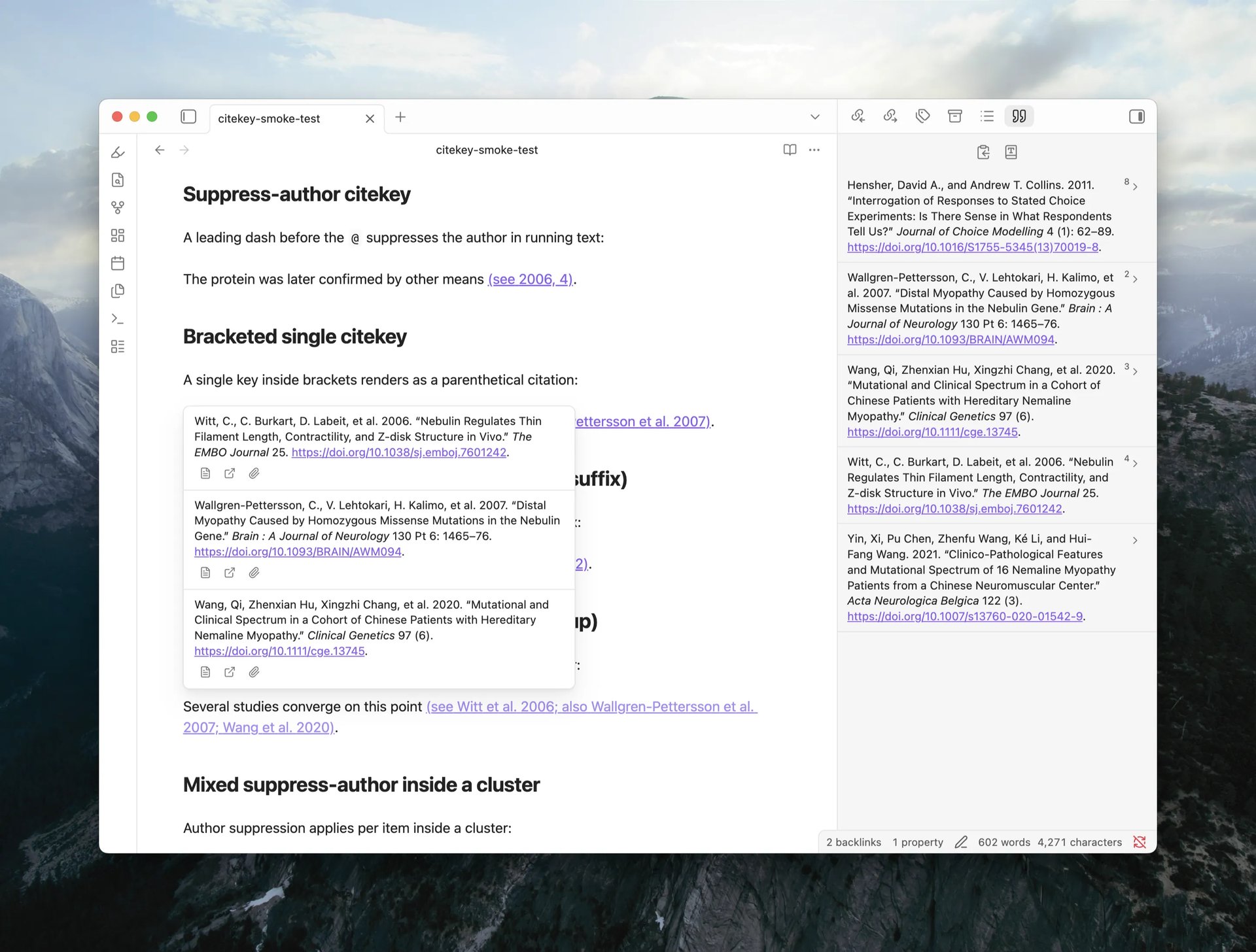
Hovering a citation now shows a popover with each cited item's full formatted bibliography entry, stacked in citation order for multi-item citations. Each entry carries action buttons to open the Literature Note, open the item in Zotero, or open its attachment. The popover works on literal Pandoc citations in Live Preview, Reading view, and Source mode, and on Literature Note wikilinks when wikilink citations are enabled.
A new Hover action setting under Settings › ZotLit › Citations › Hover controls what citation hover shows:
- Citation Popover (default): the popover described above.
- Page preview: the previous behavior, showing the Literature Note page preview under Obsidian's own Page Preview settings.
- Off: no ZotLit hover at all; native wikilink hover stays untouched.
Each mode has its own Require modifier key toggles per editing mode (Source mode requires Mod by default; Live Preview and Reading view do not). The toggles live on a sub-page under the Hover action setting.
Citation data commands for agents
Three new CLI commands, zotlit:cited-by, zotlit:references, and zotlit:citations-guide, let an AI agent query which notes cite a given item and what a document cites. Install the zotlit-citations skill for your agent to use this workflow.
What's New
Copy bibliography
The References Sidebar toolbar now offers a Copy bibliography action. One click copies the full reference list as both rich text and plain text. Emphasis, superscript, small caps, and DOI links survive a paste into Word or Google Docs. A destination that takes only plain text falls back to the text version, and the notice tells you which format was copied.
Note-class citation styles
Styles that use footnotes (such as Chicago full-note) now show numbered Entry Serials beside each citation inline and in the References Sidebar gutter, so you can see at a glance which reference number a citation carries.
Open citations as links
The Open Pandoc citations as links setting is now Open citations as links and covers both Pandoc citations and Literature Note wikilinks. It is off by default. While off, clicking a rendered citation in Live Preview places the cursor in its Markdown source (the widget collapses like clicked bold text). Mod+click still opens the Literature Note regardless of this setting.
Other improvements
- The References Sidebar toolbar now includes a Change citation and references style shortcut that opens the style picker in settings.
- Two-creator summaries (e.g. "Wang and Lee") now follow your locale's list formatting conventions.
Bug Fixes
- Fixed the Zotero database refreshing every few seconds even when nothing changed. A filesystem echo from the database clone triggered a self-feeding loop on APFS volumes.
- Fixed Mod+Enter in the note quick switcher not opening the note in a new pane. The keyboard shortcut was advertised but never registered. The modifier label now also shows the correct key per platform.
- Fixed Shift+Enter in the citation insert modal not inserting the secondary citation form. The keyboard shortcut was advertised but never registered.
- Fixed citations inside inline footnotes (
^[...]) rendering at body text size instead of matching the footnote's superscript size. - Fixed
^[...]being read as a citation cluster instead of an inline footnote. The bracket after a caret now starts an inline note as Pandoc expects. - Fixed the References Sidebar engine banners overlapping with the reference list when the list was long enough to scroll.
- Fixed two items with the same filename colliding in the citation rendering. Each item now keeps its own bibliography entry and reference number, even when both are cited in the same document.
Cited By Sidebar, filename author fields
Highlights
Cited By Sidebar
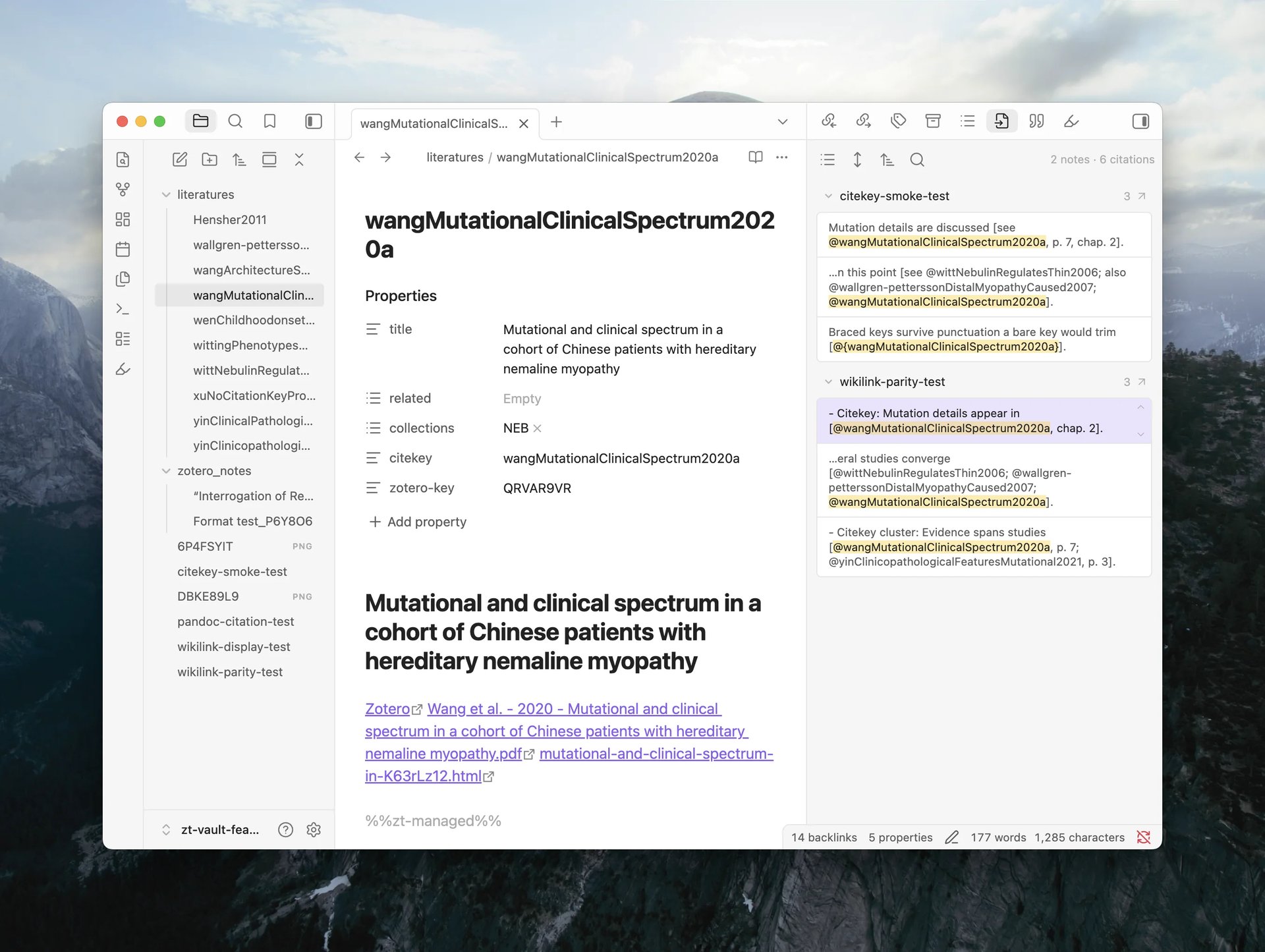
A new sidebar view shows which notes in the vault cite the active Literature Note. Open it from the command palette via 'Open cited by'. Results are grouped by source file, each with an occurrence count, and every occurrence displays an excerpt from the citing note styled as a search-result card. Click any occurrence to jump to its location in the editor.
The toolbar offers four controls, consistent with the Backlinks panel:
- Show search filter opens a text field that narrows results by file path or excerpt content.
- Show more context switches between a compact 100-character excerpt and the full enclosing block (a list item or a section).
- Change sort order offers six modes: file name (A → Z, Z → A), modified time (new → old, old → new), and created time (new → old, old → new).
- Collapse results folds or unfolds all source groups at once.
What's New
- Filename templates can now include authors and authorsShort helper variables, consistent with the note template data.
References Sidebar, in-text citation rendering, cited document export
Highlights
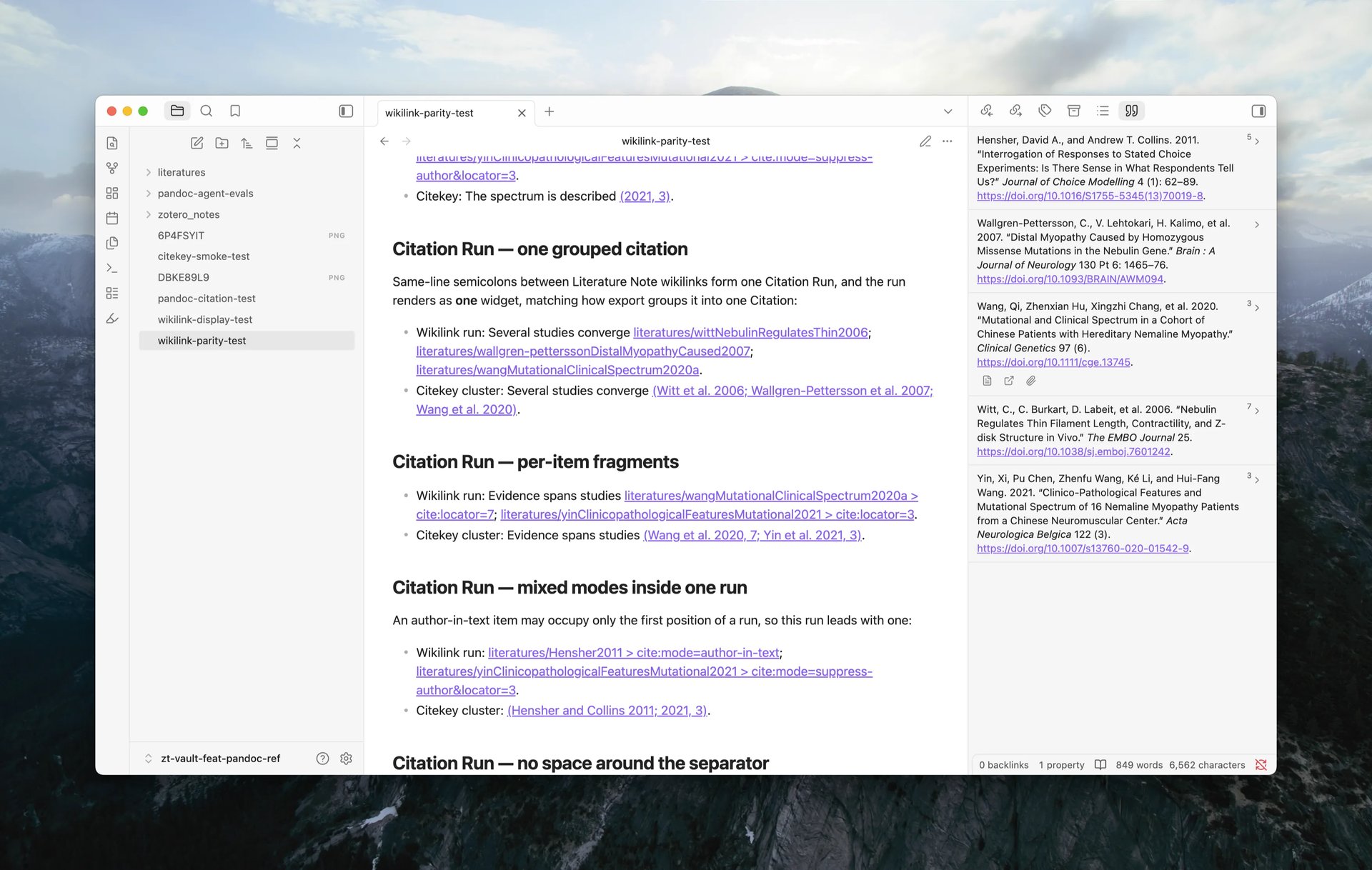
References Sidebar
A new sidebar view lists the citations in the active note as a formatted bibliography. Each entry shows the reference number and formatted text in the selected CSL style, with actions to open the Literature Note, open the item in Zotero, or open the attached PDF. Clicking the entry text walks through the citation's occurrences in the editor.
In-text citation rendering
Literal citation clusters (e.g. [see @wang2020, p. 3; @lee2019]) now display as formatted text in both Live Preview and Reading view.
Literature Note wikilinks can also render as citations, sharing the same formatted display and numbering as literal citations. Turn this on with Wikilink citations in Settings > ZotLit > Citations — it is off by default.
The citation rendering also supports formatting in a CSL style you pick from Zotero's installed styles using Pandoc (setup in Settings > ZotLit > Citations).
Export a note with citations
A new command, ZotLit: Export note with citations, converts the active Markdown note to DOCX or HTML with a formatted bibliography. Choose the output format, CSL style, and destination in the export dialog. Citations resolve from the note's own links; no external Pandoc installation is required. See How to export a note with citations.
This feature is not finalized yet, but the command is available to test.
What's New
Citation key navigation and styling
Recognized citation keys in the editor are styled as links. An unresolved citation key (one that names no item in Zotero) is visually distinct from a resolved one. Click a citation key to open its Literature Note, or hover to see a page preview.
Rendered citations in Reading view are also navigable: a single-key citation opens the Literature Note on click, and a multi-key citation opens a menu listing each cited work. See How in-text citation rendering and navigation work.
Turn this off with Open Pandoc citations as links in Settings > ZotLit > Citations.
Citation key resolution from Zotero
Citation keys now resolve against Zotero's native citation keys instead of a frontmatter property. The Citation Key Property setting is retired and migrated automatically.
CSL style selection
The References Sidebar and in-text citation rendering use a CSL style you select from the styles Zotero has installed. The style picker appears in Settings > ZotLit > Citations. Leaving it unset or selecting a removed style falls back to a default.
Native Pandoc CLI workflow
Convert a note with a standalone Pandoc installation, outside Obsidian, with Literature Note wikilinks converting to citations. A Save integration files action in the Citations settings page writes a Lua filter (zotlit-cite.lua) and a Pandoc defaults file (zotlit.yaml) matched to the installed plugin version; the Lua filter resolves each wikilink to its citation key through a new zotlit:resolve command, reachable from a CLI tool that supports Obsidian's command line interface (such as obsidian-cli).
Two more commands support this workflow: zotlit:pandoc-files returns the integration pair as JSON, and zotlit:pandoc-guide prints the setup and troubleshooting guide. A new zotlit-pandoc skill walks an AI agent through the same workflow: setup, refresh, running a native export, and diagnosing a failed run.
Theme support
- CSS classes are available on citation elements across editor and Reading view surfaces, documented in the theme hooks reference. Theme authors can style resolved, unresolved, pending, and rendered citation states.
Maintenance release, Obsidian guideline compliance
This is a maintenance release. It brings the plugin's code in line with Obsidian's official developer guidelines and carries no changes to plugin behavior, settings, or commands.
For full v2 release details, see the v2 release blog.
Batch operations on collections, Citation Key Links toggle, AGPL license
Companion 2.0.0 released alongside.
This is the first public stable release of ZotLit v2. If you participated in the beta, thank you! Your feedback shaped every part of this release.
The changes below cover what landed since beta.4; for the full v2 feature set, see the release announcement.
Before you update
ZotLit needs Obsidian 1.13.4 or newer, and your installer version must also be 1.13.4 or newer. Obsidian's in-app update does not replace the installer. Check yours in Settings > About. If the installer is older, ZotLit does not load: Obsidian shows Failed to load plugin "zotlit", and the developer console shows a SyntaxError.
To fix this, download Obsidian from the download page and run the installer over your current installation. Nothing is deleted, and no notes are lost. See how to update the Obsidian installer and the beta.4 requirement note.
License
ZotLit is now licensed under AGPL-3.0-or-later (previously MIT). The change covers code ported from Zotero, which is itself AGPL-licensed. This does not affect how you use the plugin.
Breaking Changes
Citation Key Links is now opt-in
Citation Key Links lets you click a [@citekey] reference in the editor to jump to its literature note. This feature is now an optional setting, disabled by default. If you used it during the beta or migrated from v1, it will remain enabled.
The feature resolves each citation key against Zotero's own native citation key, scoped to the citation library you have configured. If the matching item does not have a literature note yet, clicking the link creates the note and opens it.
What's New
Batch operations on libraries and collections
You can now create or update literature notes and import Zotero notes across an entire library or a single collection (including subcollections), instead of selecting items one at a time. Right-click a library or collection in Zotero's sidebar to find Create or Update Literature Notes and Import Child and Standalone Notes in the ZotLit submenu. The same actions are available as Obsidian commands and protocol links (update-all, import-all-notes).
Other improvements
- Settings actions in notices and the Welcome View now open directly to the relevant settings sub-page instead of dropping you at the tab root.
- The "Receive updates from Zotero" toggle now shows a hint linking to the install guide for ZotLit Companion, the Zotero add-on, when the Companion is not yet set up.
Template Workbench, managed frontmatter, safer attachment imports
Companion 2.0.0-beta.3 released alongside.
Breaking Changes
Obsidian version requirement
ZotLit now requires Obsidian 1.13.4 or newer. This release also requires the newer Electron version bundled with the Obsidian installer. Updating Obsidian from inside the app is not enough: download and run the latest installer over your existing installation, then reopen Obsidian before you install or update ZotLit. See How to update the Obsidian installer and the Obsidian 1.13.4 release notes.
Citation template item.extra
item.extra in citation templates now uses the same parsed ItemExtra shape as note templates. If a template reads the raw text, use item.extra.raw. See the template data reference.
What's New
Template Workbench
The Template Workbench adds Obsidian CLI commands for agents. An agent can inspect template state, render a template against Zotero data without changing your vault, and manage configured frontmatter fields.
Install the zotlit-template skill for your agent to use this workflow.
Managed frontmatter
You can drag frontmatter fields into a new order. ZotLit uses that order when it creates a new literature note. Existing notes keep their current property order.
New template filters
The Liquid syntax now includes arr_prefix, arr_suffix, and arr_replace for changing every value in an array. The obsidian_tag filter converts text or Zotero tags into valid Obsidian tags. See the template syntax reference.
Copy Zotero keys
Zotero context menus can copy the keys of selected items, attachments, notes, and annotations. Reader annotation menus also provide a copy action. In Obsidian, use ZotLit: Copy item key from a literature note's command or file menu.
Bug Fixes
- Fixed inconsistent item summaries between the Annotation View, Template Data Explorer, and Citation Suggester. These views now use the same title, creator, and date formatting.
- Attachments now copy from approved folders. Only Zotero storage, the annotation cache, and linked-attachment folders are approved by default. Add other folders under Settings > ZotLit > Attachments > Approved folders.
- Language packs now match the installed ZotLit version.
Chinese language support, attachment backlinks
What's New
Initial Chinese (Simplified) language support
The plugin now ships with Chinese (Simplified) as a downloadable language pack. Open the Language Pack section in settings to install it.
backlink field on attachments
Each attachment in zt.attachments and zt.parentAttachment now exposes a backlink field. It contains a zotero://open/... deep link that opens the attachment in Zotero's reader. This complements the existing backlink on the main item. See Template data reference.
Other improvements
- Confirmation dialogs now display correctly on Obsidian versions older than 1.13.0, where the built-in confirmation API is not available.
At Trigger for citations, rich annotation cards, citation normalization
Companion 2.0.0-beta.2 released alongside.
Breaking Changes
Citation output normalization
Rendered citation text inserted into notes is now trimmed and collapsed to a single inline line. The editor places a trailing space after the insert so the cursor lands ready to keep typing. Templates that intentionally produce multi-line citation output will see it flattened to one line when inserted.
Shift+Enter now selects the secondary citation format in the inline Citation Suggester, matching the behavior of the command-palette modal.
What's New
At Trigger for citations
An opt-in setting lets you type a bare @ to open the Citation Suggester instead of the default [@ trigger. Since the at-query has no closing bracket, use underscores in place of spaces (e.g. @cognitive_load). Enable it in the plugin settings under the citation section. See Insert citations for the full workflow.
Rich annotation cards
Annotation cards in the annotation view now render excerpts with inline formatting (bold, italic, subscript, superscript) and render Markdown comments through the same pipeline as the literature note. What you see in the card matches what the note template produces. Links in comments resolve against the literature note and open through the workspace.
Other improvements
- Context-menu labels in ZotLit Companion, the Zotero add-on, now say "Literature Note" instead of bare "note", and adopt Title Case to match Zotero's own menus.
Bug Fixes
-
zt.parentItem.authorsShortandzt.parentItem.authorsrendered empty in annotation templates, even thoughzt.parentItem.titleworked. These fields now resolve correctly.zt.parentItem.backlinkandzt.parentItem.weblinkare also filled in. -
Updating only metadata on an item that had no literature note incorrectly created a full note from the template. Metadata-scoped updates now skip items without an existing note, as documented.
Per-device Zotero paths, web library links, reader window fix
Companion 2.0.0-beta.1 released alongside.
Breaking Changes
Per-device Zotero paths
The Zotero profile and data directory paths are now per device. If you sync your vault across machines, one computer's Zotero path no longer overwrites another's. An unset path means auto-detect; a path you set on one machine stays on that machine.
If the plugin cannot find your Zotero database on a new device, the Welcome View shows a notice pointing you to the locate action. See Use ZotLit on multiple devices.
If you previously set a custom Zotero profile or data directory path, you need to re-enter it once on each device after updating. The old synced values are not migrated.
What's New
zt.weblink template field
A new template variable zt.weblink gives you the browsable Zotero web library URL for an item (e.g. https://www.zotero.org/yourname/items/ABC123), alongside the existing zt.backlink desktop deep link. It is available on the main item and on each entry in zt.relatedItems. Not available for accounts that have never synced. See Template data reference.
Bug Fixes
-
Fixed the annotation view not following a Zotero reader opened in its own window (not a tab). Only tabbed readers were tracked before; standalone reader windows are now picked up on focus.
-
Fixed batch imports and index builds slowing down when Obsidian's window was in the background or occluded.
Welcome view, annotation search, note-status column
Companion 2.0.0-beta.0 released alongside.
What's New
Welcome view
A first-run landing surface appears on fresh installs and upgrades. It shows a live setup timeline with Zotero connection status, a note-folder picker, first-note search, and quick links to docs and community.
A resources strip on the setting tab (release notes, docs, help) is available on both Obsidian 1.13 and older versions.
Annotation view: search and filter
A search row in the annotation view matches text, comment, tag, and page number. A filter bar with color swatches, a first-tag chip, and an inline tag drawer lets you narrow annotations without switching to Zotero. Cards default to collapsed for scanning, and the view reserves status-bar clearance so the list tail is never covered.
See Use the annotation view for the full workflow.
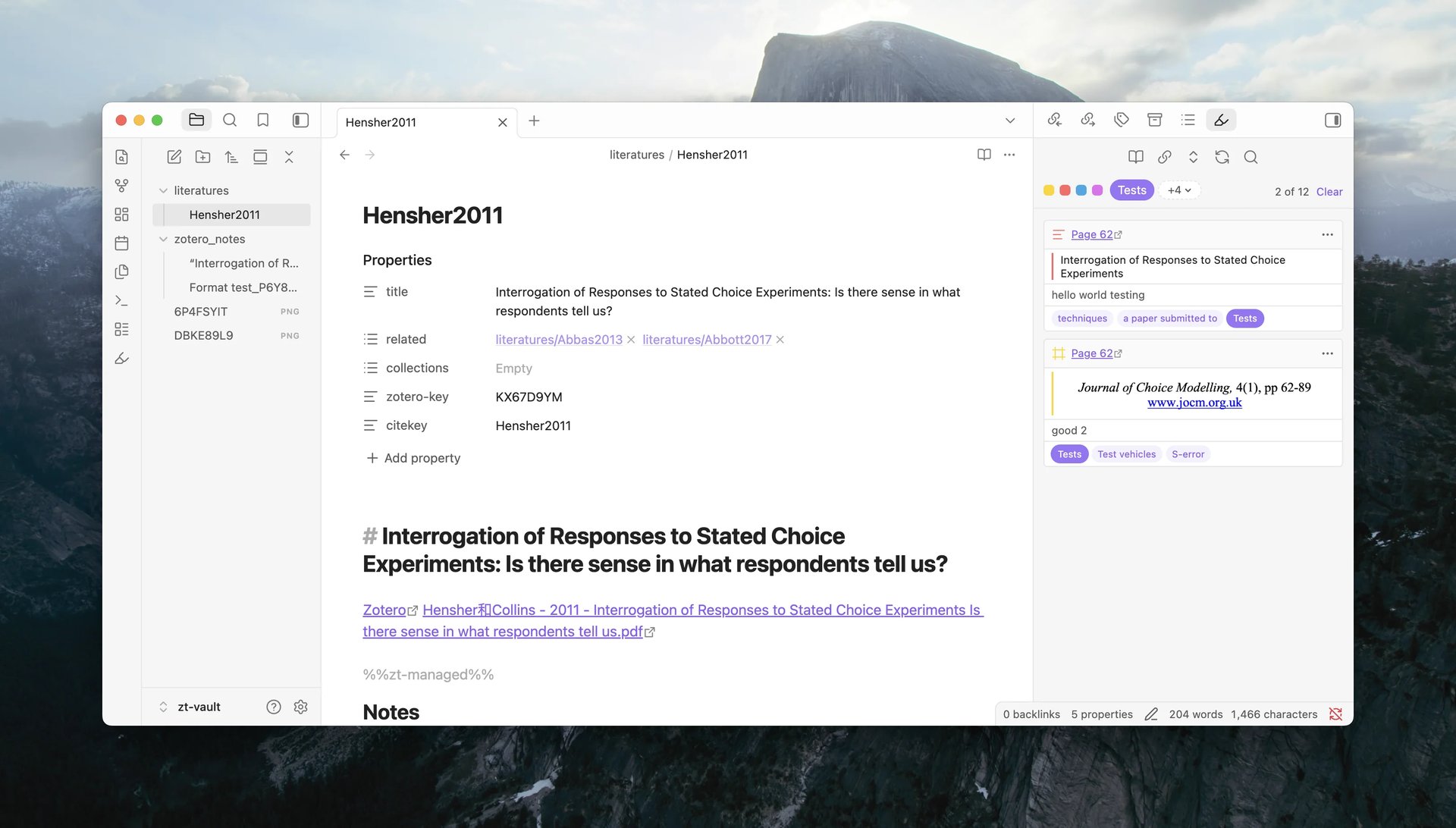
Note-status column in Zotero
ZotLit Companion, the Zotero add-on, now shows an extra column indicating which items have a corresponding literature note in Obsidian. This gives you an at-a-glance view of your note coverage from within Zotero.
v2 documentation site
The documentation site launched alongside this release, covering the full feature set: a tutorial, how-to guides, concept explanations, and a reference section for settings, commands, protocol links, and template syntax.
New guides: Suppress Zotero's security prompt, Collect debug logs, and a rewritten Migrate from v1.
Bug Fixes
- Fixed a crash on the Obsidian 1.13.3 installer at startup. Earlier installers and later versions were not affected.