ZotLit 2: a rebuilt Zotero plugin for Obsidian
A ground-up rewrite of the Zotero integration for Obsidian: literature notes, PDF annotation review, citations, and batch updates across your whole library.
August 5, 2026 · by aidenlx
ZotLit is an Obsidian plugin that connects to your local Zotero database. Create literature notes, review PDF annotations, and insert citations without leaving Obsidian. v2 is a ground-up rewrite, and today it's stable.
TL;DR
v2 fixes the crashes that hit v1 after Obsidian installer updates. It also ships an annotation workspace, batch operations across entire libraries, Liquid templates, and incremental note updates.
Install ZotLit
Requires Obsidian 1.13.4+ desktop. Upgrading from v1? Jump to migration.
Why a rewrite
v1 relied on a native SQLite binding that broke every time Obsidian updated its Electron runtime. Users hit error dialogs and black screens. Replacing that dependency meant rebuilding most of the plugin, so v2 also simplifies the internals.
For the full backstory, see Rebuilding ZotLit: the v2 public beta, and for the longer personal story behind the decision to rebuild, see Reconnecting the Dots.
Annotation workspace
If you annotate PDFs in Zotero, the annotation view gives you a workspace for reviewing highlights, comments, and annotations alongside a Literature Note. You can search across text, comments, tags, and page numbers, and filter by color or tag to narrow things down without switching back to Zotero. Drag annotations into your note individually or pull them all in at once. Clicking an annotation opens the source PDF at that location in Zotero, so you move between the two apps without losing your place.
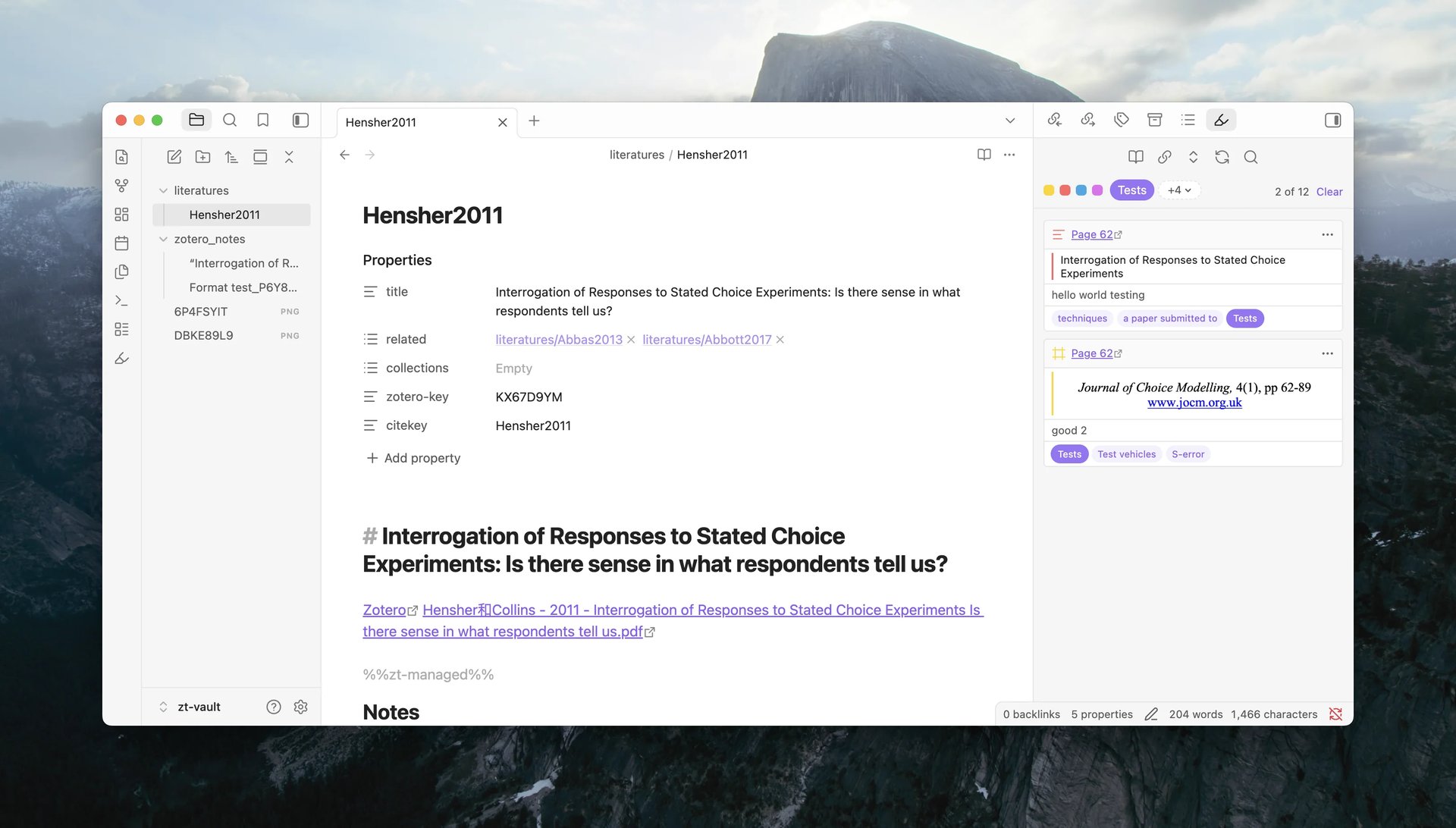
Using the annotation view
Batch operations
Creating Literature Notes one at a time is fine for a few items. It breaks down when you're onboarding an existing library or a batch of references just landed from a search. v2 handles this with batch operations that create or update notes for many items at once.
New in the stable release: you can target an entire Zotero library or a specific collection, including all its subcollections. Right-click a library or collection in Zotero's sidebar to create or update all literature notes, or import all notes underneath it. The same actions are available from Obsidian's command palette and through protocol links.
Batch operations
Templates and the Template Data Explorer
The template system controls how Literature Notes, annotations, and citations are formatted. v2 defaults to Liquid, which is easier to pick up than v1's Eta syntax. JavaScript Templates are still available when you need full control, gated behind a per-device opt-in. The Template Data Explorer shows the exact typed data available for any Zotero item, so you write templates against real values instead of guessing field names.
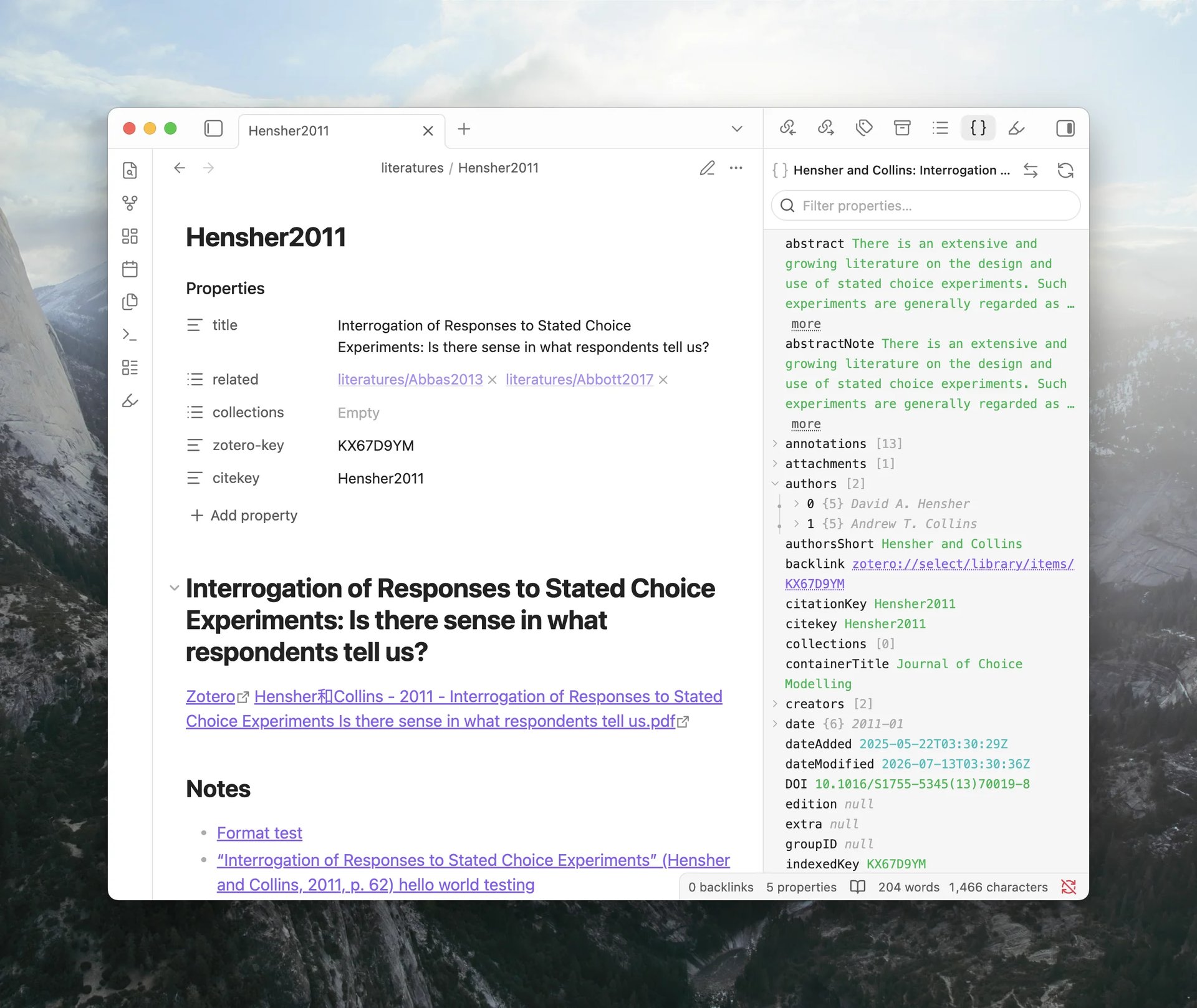
How templates work
Exploring template data
Managed region
Literature Notes have a managed region marked by %%zt-managed%% and %%/zt-managed%%. When you update a note, v2 re-renders the managed region and leaves everything else alone. Your own writing above and below the markers survives every update.
Personal notes and thoughts go here.
They survive every update.

%%zt-managed%%
**Authors:** Jane Doe, John Smith
**Abstract:** This paper examines the relationship...
%%/zt-managed%%

More notes below, also untouched.
Literature notes and the managed region
Zotero-note import
Zotero's built-in note editor is where some researchers do most of their writing. v2 can import those notes as Markdown files with content and structure preserved. Highlights become inline marks with backlinks, image excerpts become embeds, and typed comments carry over.
Importing Zotero notes
Template Workbench
If you use a coding agent like Claude Code or Codex, the Template Workbench exposes commands that let the agent inspect template state, render previews against your Zotero data, and manage frontmatter fields directly.
Template Workbench
And more
@citation trigger. Type@to open the citation suggester. Shift+Enter picks the alternate format.- ZotLit Companion, the Zotero add-on, adds a note-status column showing which items have a literature note in your vault.
- Welcome view. A setup screen with connection status and quick links. Notices link to the relevant settings page.
- Per-device Zotero paths. Paths are stored per-device, so syncing a vault between machines won't overwrite each other's configuration.
zt.weblinkis the Zotero web library URL; each attachment has abacklinkthat opens it in Zotero's reader.- Managed frontmatter. Frontmatter fields backed by template expressions re-evaluate on each note update. Drag to reorder.
- Chinese (Simplified) is the first non-English language pack, shipped as a version-pinned release asset.
Upgrading from v1
v2 introduces breaking changes. If you're coming from v1:
- Rename your template files to v2's naming convention.
- Replace
it.*references withzt.*in your Eta templates. - Enable JavaScript Templates in ZotLit's settings if you use Eta.
Migration guide
Two v1 features are retired: annotation merging and topic-based imports. The complexity they added was not justified by how often they were used.
Notable changes
ZotLit is now licensed under AGPL-3.0-or-later, matching Zotero's own license for code that ZotLit ports.
Citation Key Links is disabled by default. If you used it during the beta or migrated from v1, your setting is preserved.
What's next
I'm working on two things next: search and filter Zotero library from inside Obsidian, and improvements on the citation workflow. No timeline on either, but the design groundwork is in place for both. Stay tuned!
Feedback
Questions, ideas, and bug reports go through the community page.
Community
Last updated on