v2.2.0-beta.5
2026年10月29日
Default note body written once, annotation link previews, Show in Library everywhere
ZotLit copies text from Zotero to Obsidian only when you ask. There is no automatic sync in either direction.
Breaking Changes
The default literature note body is yours after creation
A new literature note made with the default template is written once, as a copy of what Zotero holds when you create it. The body has the title, the Zotero link, attachment links, and the Annotations section with its query block. After that, the body is yours to edit. Your edits to it never go back to Zotero, and a later change in Zotero reaches it only if you overwrite the note.
ZotLit: 更新文献笔记 now refreshes the note's properties and leaves the body as you wrote it. The annotations query block reads Zotero live, so new highlights appear without an update. It is a view of Zotero rather than a copy. See Keep notes up to date.
The default template no longer adds %%zt-managed%% markers. It also no longer lists the paper's Zotero child notes under a "Notes" heading. ZotLit: 覆盖文献笔记 still replaces the whole body after you confirm.
Child notes import only when you ask
Creating, updating, or overwriting a literature note no longer imports Zotero child notes into your vault. Before, a template that used noteLink created a Markdown file for each child note along the way.
A child note now becomes a file only when you import it. Run ZotLit: 从 Zotero 导入子笔记 or ZotLit: 导入所有子笔记和独立笔记, or start an import from Zotero. The imported file is a copy. Your edits to it never go back to Zotero, and later edits to the Zotero note reach it only when you re-import that note.
In a template, noteLink links to the imported file when one exists. Otherwise it gives a link that opens the note in Zotero. See Import Zotero notes.
Existing notes stay as they are
Notes you already have don't change. A note with the managed markers keeps them, and an update still refreshes the text between them. To stop that, delete the two marker lines. See Literature notes and the managed region.
If you customized or duplicated the Default profile, its document now has no managed block. Updating an older note with markers then shows 属性已更新。配置方案文档没有托管块,因此笔记正文保持不变。 To keep refreshing that region, add a {% managed %} block to the profile document.
What's New
Annotation links open the annotation on any computer
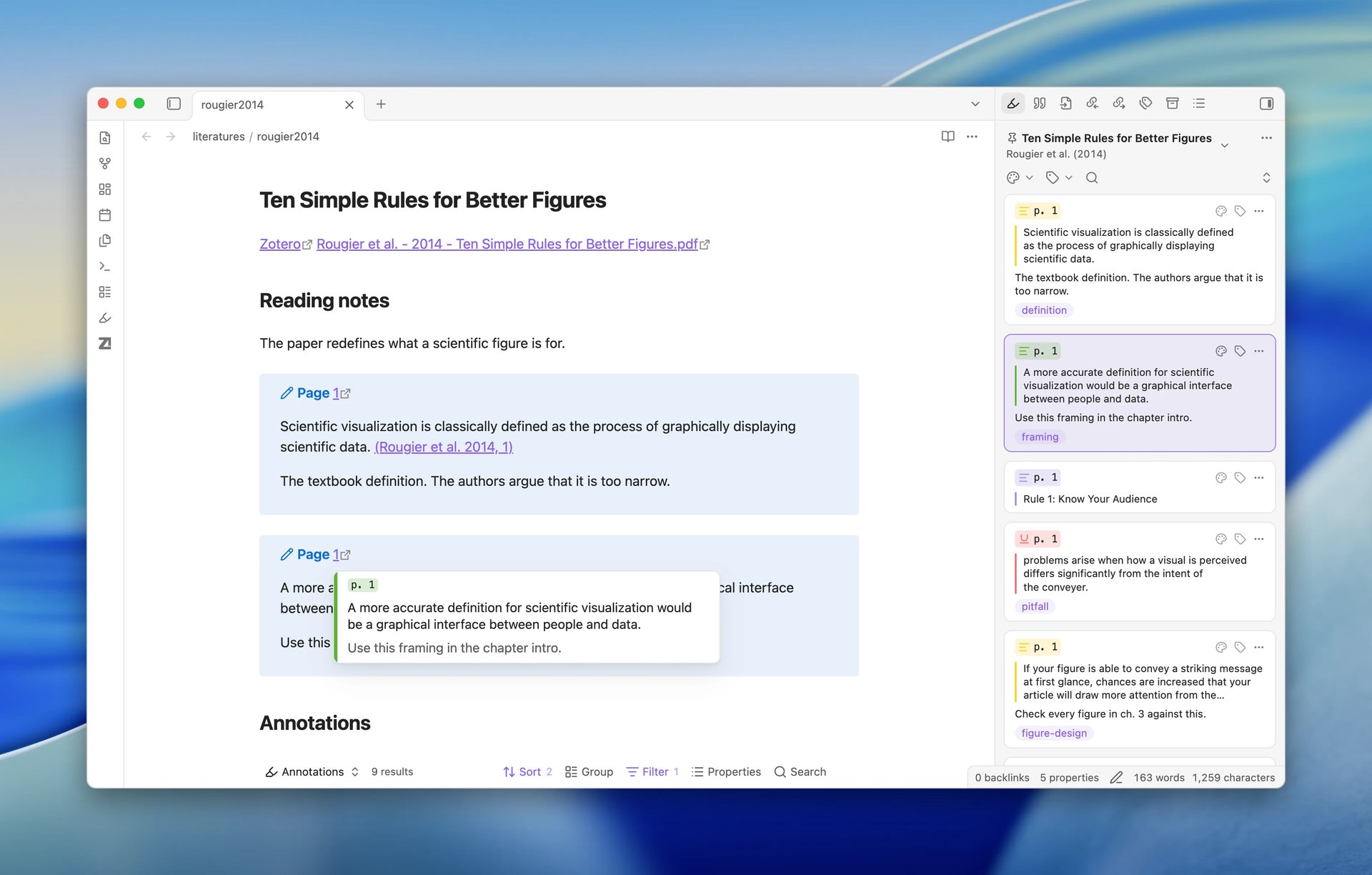
Every annotation ZotLit writes into a note now links to Zotero with a zotero://open link that names the annotation. The link works on every computer where you open the vault. Before, the link pointed to a local file and worked only where that file path existed. See Zotero open links.
When you click the link on a computer that has the PDF, the PDF opens in Obsidian's PDF reader with the annotation selected. Otherwise, Zotero opens it. To send these links to Zotero every time, turn off 在 ZotLit 阅读器中打开标注链接 under Settings > ZotLit > 阅读器. It is on by default. See Open a PDF from a link in a note.
Hover over an annotation link in Live Preview, Source mode, or Reading view to see a popover. It shows the quote, your comment, the page, and the highlight color. For an image or ink annotation, it shows the image. The 悬停行为 setting under Settings > ZotLit > 引文 controls this popover. Set it to 关闭 to turn it off.
The default annotation template has a new layout. The paper's citation now follows the quote, and the page label is the link. When the annotation has no page label, the link reads "[Zotero]". If you use the default template, annotations you insert from now on look different from your older ones. Custom templates keep their output. See Default templates.
A new 批注引用 setting under Settings > ZotLit > 引文 is off by default. Turn it on to count an annotation link as a citation of its paper. The paper then appears in the 参考文献 sidebar and the other citation features. See How in-text citation rendering and navigation work.
Show any paper in the Zotero library view
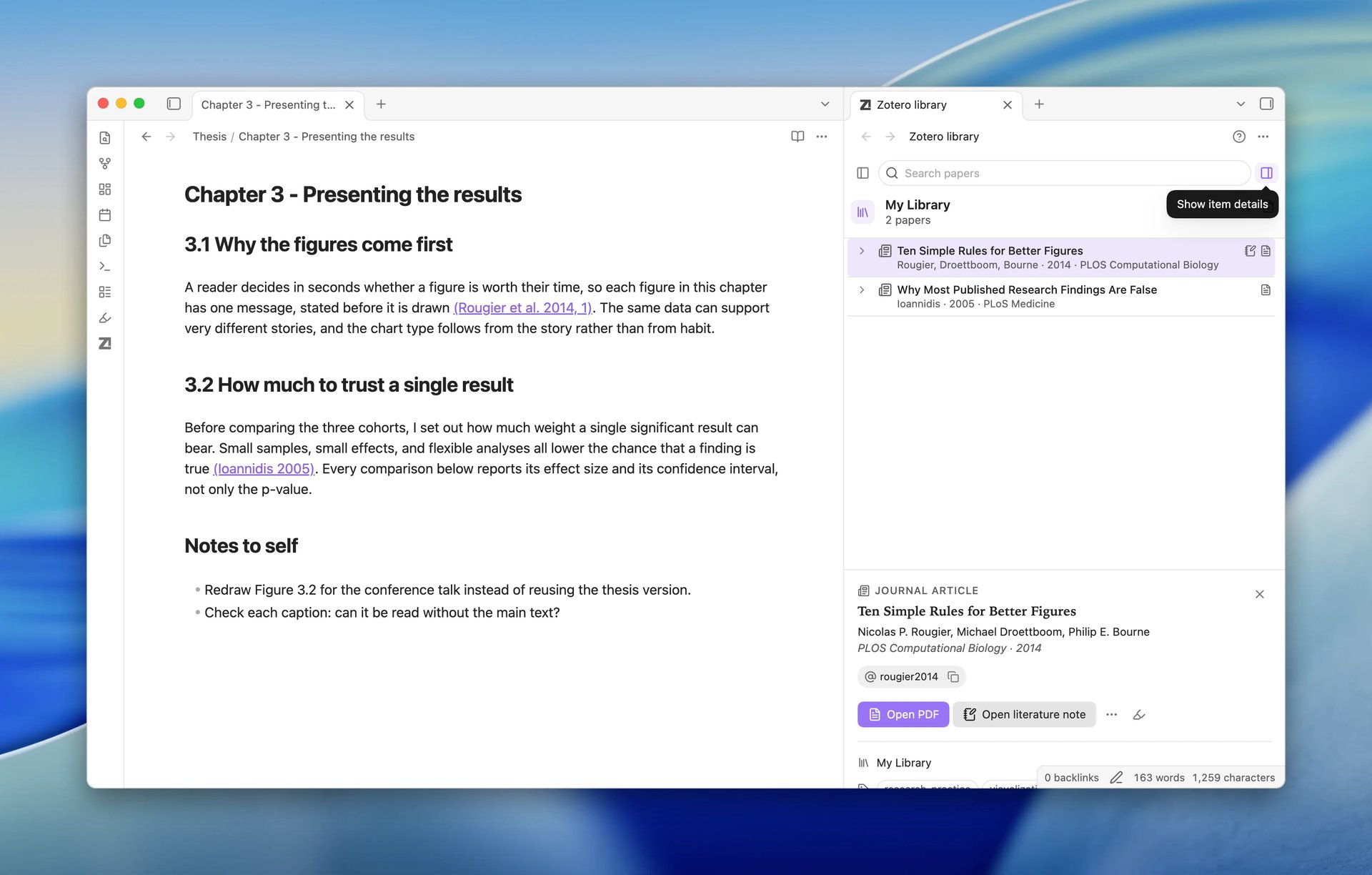
在 Zotero 文库中显示 now appears wherever ZotLit
shows a paper. You find it on rows in the
参考文献 sidebar and in the
被引用 toolbar. It is also in the citation
hover popover, in the graph menu of a cited work, and in a literature note's
file menu. The new ZotLit: 在 Zotero 文库中显示条目
command does the same. Before, only Alt+Enter in the quick switcher did this.
See Show a paper in the
library.

The Library View clears its search and filters so nothing hides the paper, then flashes the paper's row. When the paper is in none of your libraries, the view keeps your search and filters and shows 在你的文库中找不到该 Zotero 条目。
Templates have a new zt.librarylink variable. It gives an obsidian://zotlit/show-in-library link that works on every device you sync the vault to. It is available on the note's item, its parent item, and its related items. See Template data.
Other improvements
- The item details in the Library View now show and hide on request. Use the 显示条目详情 button at the end of the search row, press
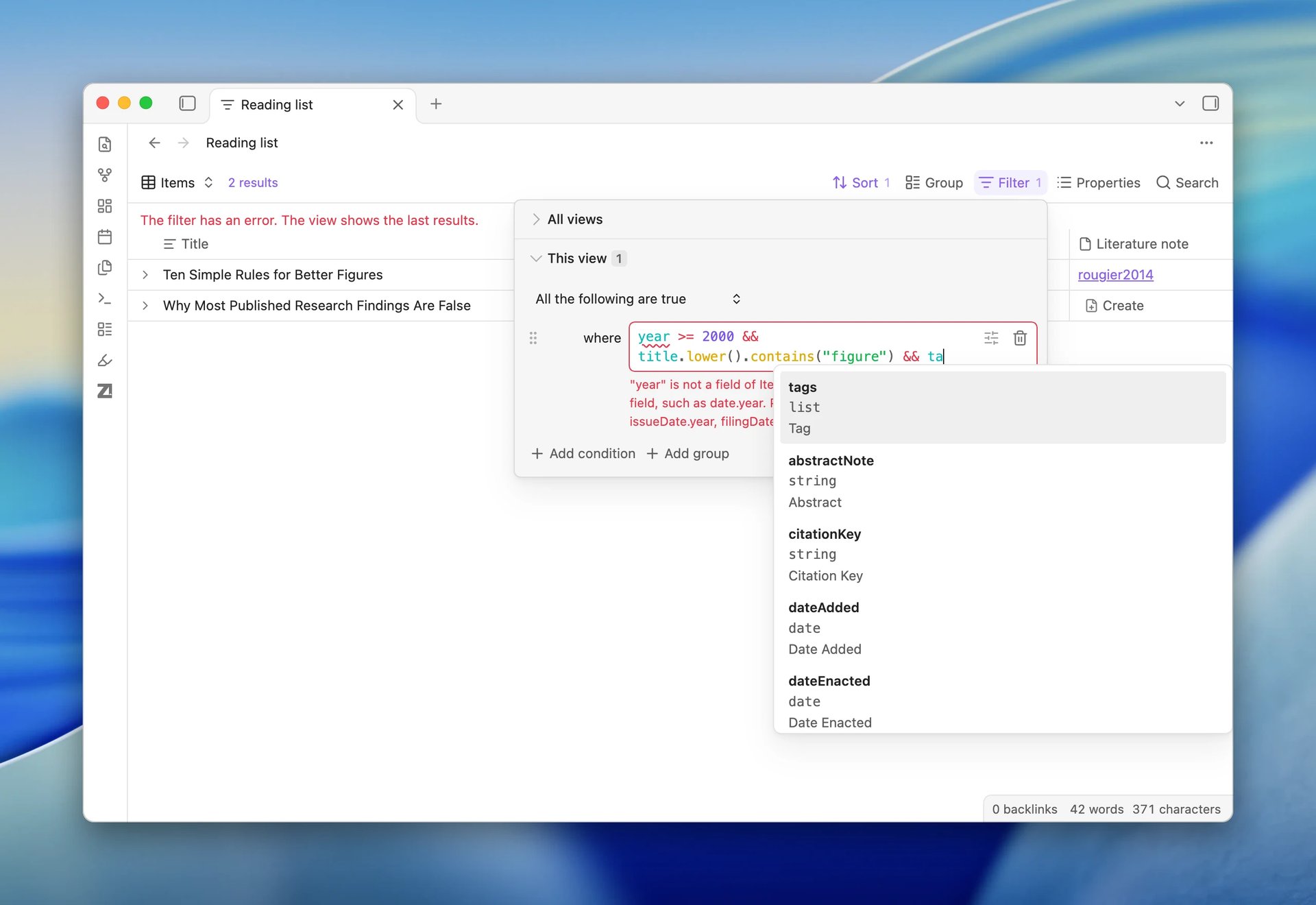
Spaceon a row, or select 关闭 on the card. ZotLit remembers your choice. A click or an arrow key now only selects a row, so the selection responds at once. With no paper selected, the details show counts for the library or collection. On a narrow pane, the details sit under the list at full width, and you can resize them. You can collapse and resize the library tree, and wide details use two columns. See Read a paper's Reading Card. - Filter expression editors now color the code and put a wavy underline under errors. This covers the Query View filter, Formula fields, and Profile match. They also complete field and function names (press
TaborEnterto accept). A hint shows a function's arguments as you type. See Filter the rows. - The citation suggester and ZotLit: 插入 Markdown 引用 list the papers the note already cites first when you have typed nothing yet. Those rows show 已在本笔记中引用. See Insert citations.
- The welcome checklist has an optional, recommended step: 安装 ZotLit Companion. The step shows 已安装 once Zotero has the Companion. See Install ZotLit Companion.
- The page chip on a card in the Zotero 标注 view opens the PDF in Obsidian when the file is on this computer, and in Zotero otherwise. Before, it always opened Zotero. See Open an item's PDF in Obsidian.
- An annotation you insert from the Zotero 标注 view, by the card menu or by drag, now gets correct spacing. It gets a space before it after a word and a space after it before the next word. It gets no space before closing punctuation. Stray line breaks around a one-line quote are removed.
- ZotLit: 创建或更新所有文献笔记 is much faster in large libraries. For 10,000 new notes, the confirmation appears in about one second instead of about ten.
- Notes with many citations open and update faster.
Bug Fixes
- If you pressed
Enteror clicked right after typing in a picker, the picker could act on an earlier search. This affected the quick switcher, ZotLit: 插入 Markdown 引用, the item chooser, and the citation suggester. It could insert the wrong citation or create the wrong note. NowEnterwaits for the results of what you typed. - A search for an eight-letter word, such as "thinking" or "kahneman", found nothing. Now it finds the matches.
- The Zotero 标注 view could stay on 加载中… after you switched to a paper whose annotations load slowly. It stayed there until you clicked into it. Now the cards load.
- A citation inside the prefix or suffix of another citation, such as
[@a with [[Note]]], broke the Pandoc export of the outer citation. Now the inner citation exports as text, and its work still appears in the bibliography. See Export a note with citations. - After a reload, a restored PDF tab could count as a read with no page turn. The paper then moved up in Recent and in Zotero's Recently Read list. Now only real page turns count. See Keep the read time in Zotero.
- If you turned ZotLit off and on quickly, commands could go missing or a start-up error notice could appear. Now ZotLit starts cleanly.
- In the Query View filter, property names shrank to an icon or were cut off, and tag chips broke mid-word. Now they show in full.
- Keyboard fixes:
Escapethat cancels a resize no longer clears the selection.- In the item menu of a list cell,
Deleteno longer removes the item, andEscapecloses only the menu. Escapecloses the tag editor.- Undo works in the match expression field.
- Fast typing in a filter expression could move focus away and drop keys. Now every key reaches the field.